
Break-Fix or Managed IT Support: Which Is Right for Your Business?
Every business needs reliable IT systems to keep daily operations running smoothly. Whether you have five employees or fifty, problems with computers, networks, emails or servers can affect productivity and customer service.
But when something goes wrong, how should your business handle it?
Some companies contact an IT technician only when they experience a problem. Others pay for ongoing IT support to help maintain their systems and reduce the risk of unexpected failures.
These two approaches are known as break-fix IT support and managed IT support.
Both have advantages, but they work differently and suit different business needs.
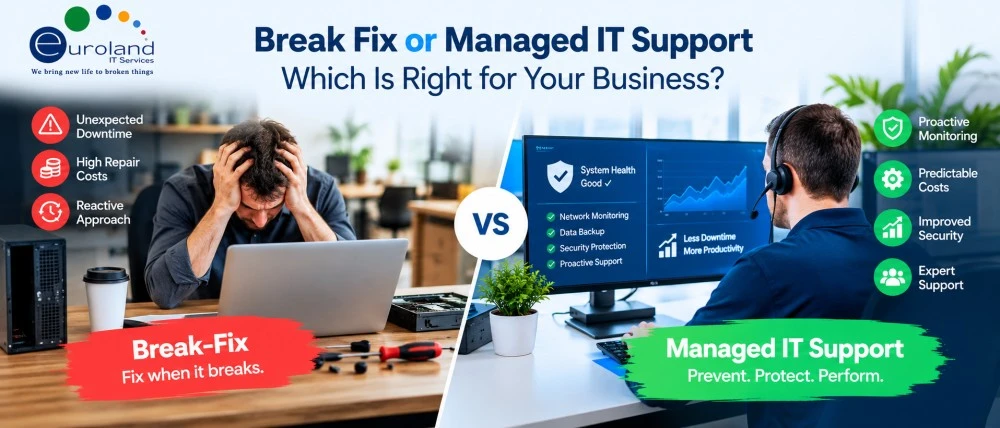
If you are unsure which option is right for your company, this guide explains the differences, costs, benefits and important factors to consider before making a decision.
What Is Break-Fix IT Support?
Break-fix IT support is a traditional approach where businesses contact an IT technician when something stops working.
There is usually no ongoing maintenance agreement. Instead, the business pays for the technical assistance it needs.
For example, imagine your office printer suddenly stops connecting to the network.
You contact an IT support company, explain the problem and arrange for a technician to investigate. Once the issue is fixed, you pay for the work completed.
The same approach can apply to laptop repairs, software problems, server faults and other technical issues.
How Does Break-Fix IT Support Work?
The process is generally straightforward:
- Your business experiences an IT problem.
- You contact an IT technician or support company.
- The technician investigates the issue.
- The problem is repaired or resolved.
- You receive an invoice for the service.
Break-fix support is mainly reactive. This means technical assistance is usually provided after a problem has occurred.
Advantages of Break-Fix IT Support
No fixed monthly support fee: Businesses generally pay only when they request assistance.
Suitable for occasional problems: Companies with simple IT systems may not require ongoing technical support.
Flexibility: You can request assistance for specific issues without committing to a long-term managed service contract.
Disadvantages of Break-Fix IT Support
The biggest limitation is that IT problems are usually addressed only after they affect the business.
Unexpected hardware failures, software issues or network outages may interrupt work while you wait for assistance.
Costs can also be difficult to predict, particularly if several technical problems occur within a short period.
Another concern is that regular maintenance, security monitoring and preventative checks may not be included.
What Is Managed IT Support?
Managed IT support takes a different approach.
Instead of waiting for something to break, a managed IT support provider helps maintain, monitor and support your business IT systems on an ongoing basis.
Businesses usually pay a fixed monthly fee based on the services, number of users, devices or infrastructure covered.
For example, a company with 25 employees may use managed IT support to maintain its computers, monitor network performance, manage software updates and provide technical assistance when employees need help.
The aim is to identify and address potential problems before they cause serious disruption.
What Does Managed IT Support Usually Include?
Services vary between providers, but managed IT support may include:
- Helpdesk support for employees
- Computer and server monitoring
- Software updates and patch management
- Network maintenance and troubleshooting
- Cybersecurity monitoring and protection
- Backup monitoring and recovery assistance
- IT asset management
- Regular system health checks
- IT planning and technical advice
Businesses looking for ongoing IT support in London should check which services are included in their agreement.
Advantages of Managed IT Support
Proactive maintenance: Regular monitoring and updates can help reduce the risk of avoidable IT problems.
Predictable costs: A recurring support fee can make IT budgeting easier.
Ongoing technical assistance: Employees have an agreed support process when they experience technical issues.
Improved IT planning: Businesses can receive guidance on equipment replacement, system upgrades and future technology requirements.
Disadvantages of Managed IT Support
Managed IT support involves a recurring cost, even during months when your business experiences very few technical problems.
Some providers also require minimum contract periods.
Additionally, not every service is automatically included. Hardware replacement, specialist software support and major IT projects may involve additional charges.
This is why reviewing the service agreement is important.
Break-Fix vs Managed IT Support: Key Differences
The main difference is when and how IT support is delivered.
| Feature | Break-Fix IT Support | Managed IT Support |
|---|---|---|
| Support approach | Reactive | Mainly proactive |
| Payment | Pay per incident or job | Usually a monthly fee |
| Maintenance | Usually arranged separately | Often included |
| System monitoring | Usually not included | Often included |
| IT budgeting | Variable costs | More predictable costs |
| Response times | Based on availability or agreed terms | Often defined by an SLA |
| Security updates | Usually handled separately | May be included |
| Long-term IT planning | Limited unless requested | Often available |
| Best suited for | Businesses with occasional IT needs | Businesses needing regular IT support |
Neither option is automatically better for every company.
The right choice depends on how much your business relies on technology and how you prefer to manage IT costs.
Which IT Support Option Is More Cost-Effective?
Cost is often the first thing businesses consider when choosing between break-fix and managed IT support.
At first, break-fix may appear cheaper because there is no regular monthly fee.
However, the total cost depends on how often technical problems occur and how much those problems affect your business.
Example: A Small Business With 10 Employees
Imagine a business with 10 employees and a relatively simple IT setup.
The company experiences only two minor technical problems during the year, and each repair costs £150.
Its annual break-fix support cost would be £300.
If the company had a managed IT support contract costing £300 per month, the annual contract fee would be £3,600.
In this example, break-fix is cheaper based on direct support fees alone.
However, the comparison changes if the business experiences repeated problems, a serious server failure or several hours of lost productivity.
Managed IT support may help reduce some of these risks through ongoing maintenance and monitoring.
These figures are illustrative, not actual Euroland IT Services prices or market quotations. Contract coverage, repair costs and downtime must be considered when comparing options.
When Should You Choose Break-Fix IT Support?
Break-fix support may be suitable when your business has limited technical requirements and does not experience frequent IT problems.
For example, a small consultancy with three employees may rely mainly on laptops, cloud-based email and online applications.
If the employees are comfortable handling basic software updates and troubleshooting, they may prefer to contact an IT technician only when necessary.
Break-fix may also work for businesses that already have an internal IT team but occasionally require external assistance for specific problems.
However, it is still important to have suitable data backups, cybersecurity protection and maintenance arrangements.
Choosing break-fix support should not mean ignoring IT security or waiting until critical equipment fails.
When Is Managed IT Support the Better Choice?
Managed IT support is often more suitable for businesses that depend heavily on technology throughout the working day.
Consider a company with 40 employees using shared servers, business applications, network printers and cloud services.
If the network stops working, many employees may be unable to complete their tasks.
In this situation, ongoing monitoring, maintenance and access to technical support may provide greater value than paying only when problems occur.
Managed IT support may be particularly useful for businesses that:
- Have multiple employees or office locations
- Rely on servers and shared network systems
- Handle confidential customer or employee information
- Need regular software and security updates
- Experience frequent technical problems
- Have limited internal IT resources
- Want predictable IT support costs
Businesses with complex network requirements may also benefit from professional network support services in London to maintain reliable connectivity.
Can You Use Break-Fix and Managed IT Support Together?
Yes. Some businesses use a combination of both approaches.
For example, a company may have a managed IT support agreement covering its computers, servers and network infrastructure.
However, it may still pay separately for occasional services such as replacing hardware, installing new equipment or completing a major office upgrade.
Another business might manage its everyday IT needs internally while using an external provider for specialist maintenance and emergency repairs.
This is sometimes called a hybrid IT support approach.
It can provide flexibility, but responsibilities must be clearly defined to avoid confusion.
For example, the agreement should explain who handles cybersecurity incidents, backups, hardware failures and third-party software problems.
Five Questions to Ask Before Choosing an IT Support Model
Before making a decision, consider these practical questions.
Q1. How Often Does Your Business Experience IT Problems?
A: If your employees regularly report computer, network or software problems, ongoing support may be more practical.
Businesses with only occasional technical issues may prefer break-fix assistance.
Q2: How Much Does IT Downtime Cost Your Business?
A: Think about what happens when your employees cannot access important systems.
If even one hour of downtime affects customer service, sales or daily operations, preventative maintenance may be worth considering.
Q3: Do You Have an Internal IT Team?
A: Businesses with experienced internal IT staff may only need external support for specialist tasks.
Companies without dedicated IT employees may benefit from a managed service provider that can handle routine technical requirements.
Q4: How Important Is Cybersecurity?
A: Every business should take cybersecurity seriously, regardless of size.
If your organisation handles sensitive information, you need clear arrangements for software updates, security monitoring, backups and incident response.
Managed IT support may include some of these services, but you should always confirm the exact coverage.
Q5: Do You Prefer Fixed or Variable IT Costs?
A: Break-fix support involves paying when problems occur, which can make expenses less predictable.
Managed IT support generally involves recurring fees, making regular support costs easier to plan.
Consider which approach works best for your budget and business operations.
What Should You Check Before Signing an IT Support Contract?
Whether you choose break-fix or managed IT support, it is important to understand the service terms.
Ask your provider to explain the support hours, pricing structure, response times and any additional charges.
For managed services, review the Service Level Agreement (SLA) carefully.
An SLA may define how quickly the provider responds to critical issues and how different support requests are prioritised.
You should also check whether the agreement covers remote support, on-site visits, hardware repairs, backups and cybersecurity services.
If your business is growing, ask whether the support package can be adjusted as you add employees, devices or office locations.
Final Thoughts: Which IT Support Model Should You Choose?
Break-fix and managed IT support both have a place in business IT management.
Break-fix offers flexibility and can be cost-effective for companies with simple technology requirements and infrequent problems.
Managed IT support provides ongoing assistance, preventative maintenance and more predictable support costs. It may be a better fit for businesses that depend on reliable IT systems every day.
The best decision is not always about choosing the cheapest monthly option.
Instead, consider how your business uses technology, how much downtime it can tolerate and what level of technical assistance your employees need.
Need Help Choosing the Right IT Support for Your Business?
Euroland IT Services provides professional IT support for businesses in London and across the UK.
Whether you need assistance with computer problems, network maintenance or ongoing IT management, our team can help you assess your IT requirements and explore suitable support options.
Visit Euroland IT Services or call 0800 088 6401 to discuss your business IT needs.
Frequently Asked Questions About Break-Fix and Managed IT Support
Q1: What is the main difference between break-fix and managed IT support?
A: Break-fix IT support provides technical assistance when a problem occurs, usually with a charge for each job. Managed IT support involves ongoing services such as monitoring, maintenance and helpdesk assistance, typically for a recurring fee.
Q2: Is managed IT support better for small businesses?
A: It depends on the business. Small companies that rely heavily on technology may benefit from managed IT support, while those with simple systems and occasional technical problems may find break-fix more suitable.
Q3: Is break-fix IT support cheaper than managed IT support?
A: Break-fix may cost less when technical problems are rare. However, repeated repairs, emergency call-outs and business downtime can increase the total cost. Comparing annual expenses and operational risks gives a clearer picture.
Q4: Does managed IT support include cybersecurity?
A: Many managed IT support packages include some cybersecurity services, such as security updates, monitoring or endpoint protection. However, coverage varies between providers, and advanced security services may cost extra.
Q5: Can a business switch from break-fix to managed IT support?
A: Yes. Businesses can move from break-fix to managed IT support as their requirements change. Before switching, review existing equipment, software, security arrangements and support needs to choose a suitable service package.