
What Are SLAs in IT Support, and What Response Times Should You Expect?
Your office internet stops working at 10 am. Employees cannot access shared files, customers are waiting for replies, and your team is unable to complete important tasks.
You contact your IT support provider and receive a confirmation that your request has been logged.
But how long should you wait for help? Will someone respond within 15 minutes, an hour or the next working day? And does a quick response mean the problem will be fixed immediately?
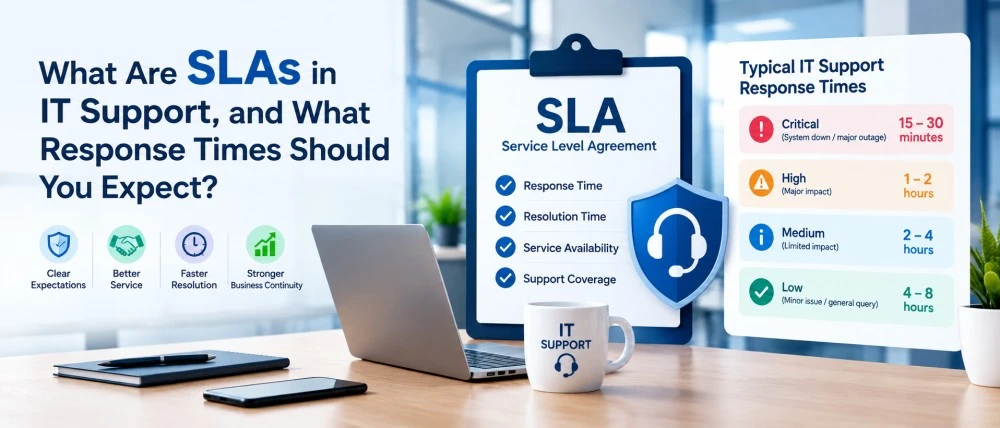
These are the questions that a Service Level Agreement (SLA) should help answer.
An IT support SLA explains the level of service a business can expect from its IT provider. It sets out response times, support availability, priorities and responsibilities.
For businesses in London and across the UK, understanding IT support SLAs can help prevent confusion, reduce unnecessary delays and make it easier to choose a suitable support provider.
What Does SLA Mean in IT Support?
SLA stands for Service Level Agreement.
It is an agreement between an IT service provider and a customer that defines the service standards the provider commits to delivering.
Instead of relying on general promises such as “fast IT support” or “quick technical assistance”, an SLA provides measurable service targets.
For example, an IT support company may agree to respond to critical issues within 30 minutes during contracted support hours.
An SLA may cover several areas, including:
- How quickly support requests will receive a response
- Which technical issues are considered urgent
- When IT support is available
- How incidents are escalated
- Expected resolution or restoration targets
- How service performance is measured
- What happens if agreed service levels are not met
A well-written SLA helps both parties understand what is included in the service.
However, not every IT support contract offers the same commitments. Businesses should review the agreement carefully before signing.
IT Support Response Time vs Resolution Time: What’s the Difference?
Many businesses confuse response time with resolution time. However, both have different meanings in an IT support SLA.
Response Time: This is how long your IT support provider takes to acknowledge your request or start working on the issue, depending on the agreement.
Resolution Time: This is how long your IT support provider takes to fix the problem and restore normal operations.
Example of IT Support Response and Resolution Times
Imagine your office internet stops working at 10:00 am.
- 10:00 am: You report the internet problem to your IT support provider.
- 10:15 am: The IT support team responds and starts investigating the issue.
- 11:30 am: The technical problem is fixed, and your internet connection is working again.
In this example:
- Response Time: 15 minutes
- Resolution Time: 1 hour and 30 minutes
This means your IT provider responded within 15 minutes, but it took 90 minutes to resolve the problem.
Important: A fast response does not always mean an immediate solution. When choosing an IT support provider, check both response and resolution commitments in the SLA.
What IT Support Response Times Should Businesses Expect?
There is no single response-time standard that every IT support company in the UK must follow.
Response targets depend on the service contract, support hours, business requirements and severity of the problem.
Most IT support providers classify incidents according to priority.
The following table shows illustrative targets that businesses can use when comparing IT support agreements.
| Priority | Example issue | Example response target |
|---|---|---|
| P1: Critical | Entire business network or key server unavailable | 15 to 30 minutes |
| P2: High | Major application unavailable to several employees | 30 to 60 minutes |
| P3: Medium | One employee unable to access email | 2 to 4 business hours |
| P4: Low | Software installation or general IT request | Within 1 business day |
These are examples, not legally required or guaranteed industry response times.
Some providers offer faster targets, while others operate on longer timescales.
A small business with basic IT requirements may not need the same response commitments as a financial services company or an organisation operating around the clock.
The important point is to choose an SLA that reflects the impact an IT problem could have on your business.
How Are IT Support Issues Prioritised?
Not every IT problem requires an immediate response.
For example, a printer not working in one department is inconvenient, but it may not be as urgent as a complete network failure affecting the entire office.
IT support providers generally assess two important factors when deciding the priority of an incident.
Impact: How many people, systems or business operations are affected?
Urgency: How quickly must the problem be addressed to avoid serious disruption?
An issue affecting one employee may receive a lower priority than a problem preventing an entire company from working.
However, there are exceptions.
If the only employee responsible for processing urgent customer payments cannot access a critical application, the problem may deserve a higher priority despite affecting just one person.
A good SLA should explain how incidents are classified and whether their priority can change as circumstances develop.
What Should Be Included in an IT Support SLA?
When reviewing an IT support agreement, do not focus only on the promised response time.
Several other details can affect the quality and reliability of the service.
Support Hours and Availability
Some IT providers offer support during standard business hours, such as Monday to Friday, 9 am to 6 pm.
Others provide extended-hours or 24/7 assistance.
A one-hour response commitment during business hours is very different from a one-hour response commitment at any time of day.
Check whether weekends, bank holidays and out-of-hours incidents are covered.
Remote and On-Site Support
Many IT problems can be resolved remotely.
However, certain issues, such as hardware failures or physical network faults, may require an engineer to visit your office.
Your SLA should explain when on-site assistance is available and whether separate attendance targets apply.
Businesses using IT support services in London should clarify how remote assistance and office visits are handled under their agreement.
Incident Escalation
What happens if the first support engineer cannot resolve the problem?
An escalation process explains when an issue is passed to a more experienced engineer, specialist team or external supplier.
This is particularly important for complex server, network and cybersecurity problems.
Service Exclusions
Not every technical issue may be covered by your support agreement.
For example, support for third-party applications, outdated equipment, specialist software or equipment purchased independently may be subject to additional conditions.
Check the exclusions before signing so your business understands what is covered.
Reporting and Accountability
Some providers offer regular service reports showing how many support requests were received, how quickly they were handled and whether SLA targets were achieved.
These reports can help businesses assess the quality of their IT support.
Does a Faster SLA Always Mean Better IT Support?
Not necessarily.
A provider promising a 10-minute response may sound more attractive than one offering a 30-minute response.
However, response speed alone does not tell you how effectively the provider will resolve the problem.
Consider two situations.
Provider A responds within 10 minutes but takes several hours to investigate a recurring network issue.
Provider B responds within 30 minutes, identifies the underlying cause and implements a reliable solution.
Both providers may meet their agreed targets, but the overall customer experience could be very different.
Businesses should therefore consider technical expertise, communication, resolution performance and preventative maintenance alongside response times.
For organisations with complex networks, dependable IT network support can be particularly important when dealing with connectivity problems and infrastructure failures.
Why Do Different Businesses Need Different SLAs?
The right SLA depends on how heavily a business relies on technology and how much disruption it can tolerate.
A small office using cloud-based email and basic business software may be comfortable with standard working-hours support.
A healthcare organisation, however, may depend on technology to access patient information, manage appointments and support clinical operations.
A prolonged system outage could have serious consequences.
Similarly, schools and universities may need reliable access to teaching platforms, administrative systems and network infrastructure during important working periods.
Businesses should consider the operational impact of downtime before deciding which response targets they need.
This is particularly relevant for organisations seeking specialist IT support for healthcare organisations or IT support for schools and education.
What Questions Should You Ask Before Signing an IT Support SLA?
Before choosing an IT support provider, ask the following questions:
- How are critical, high, medium and low-priority issues classified?
- Does the response time mean acknowledgement or active technical investigation?
- Are response targets measured during business hours or 24/7?
- Does the agreement include resolution or service restoration targets?
- What happens when an issue cannot be resolved within the expected timeframe?
- Are on-site engineer visits included?
- How are SLA breaches recorded and handled?
- Are third-party software, internet and hardware issues covered?
It is also worth asking when the SLA response clock starts and whether it can be paused while waiting for customer information or third-party suppliers.
These details can make a significant difference when a serious technical issue occurs.
How Can Businesses Improve IT Support Response and Resolution Times?
An SLA defines expectations, but businesses can also take practical steps to help their IT provider respond more effectively.
When reporting a problem, provide clear information about what has happened.
Instead of simply saying “the internet is not working”, explain which employees are affected, when the issue started and whether other services are also unavailable.
Screenshots and error messages can also help engineers identify the problem more quickly.
Keeping hardware and software inventories up to date is equally useful.
Businesses should also ensure that employees know how to report urgent incidents and which contact method to use.
Regular IT maintenance, system monitoring and software updates may help identify problems before they cause major disruption.
Final Thoughts
An IT support SLA helps businesses understand what to expect when technical problems occur.
It provides a clearer picture of how quickly a provider should respond, which issues receive priority and what level of assistance is included.
However, choosing the right IT support provider involves more than comparing response times.
Businesses should also consider technical experience, service availability, communication and the ability to prevent recurring problems.
Before signing an agreement, make sure the SLA reflects your business operations and the level of disruption you can reasonably tolerate.
Looking for Reliable IT Support in London?
Euroland IT Services provides professional IT support for businesses in London and across the UK.
Whether you need assistance with everyday technical issues, network support or ongoing IT management, our team can help you understand your business IT requirements.
Visit Euroland IT Services or call 0800 088 6401 to discuss your IT support needs and available service arrangements.
Frequently Asked Questions About IT Support SLAs
Q1: What is a good SLA response time for IT support?
A: A good response time depends on the severity of the problem and your business requirements. For critical incidents, some agreements offer targets of 15 to 30 minutes. Less urgent requests may have response targets of several business hours or the next working day.
Q:2 Is an SLA legally required for IT support in the UK?
A: There is no general UK legal requirement for every IT support arrangement to include a formal SLA. However, an SLA can provide clear contractual commitments. Certain regulated organisations may also have specific requirements relating to outsourcing, resilience or service management.
Q3: Does an SLA guarantee that an IT issue will be fixed?
A: Not always. Some SLAs guarantee only an initial response or other specified service commitments. Resolution times may be targets rather than guarantees, particularly when issues depend on external suppliers or replacement hardware.
Q4: What happens if an IT support provider misses its SLA?
A: The outcome depends on the agreement. Some contracts include service credits, escalation procedures or other remedies when service targets are missed. Businesses should check these conditions before signing.
Q5: What is the difference between an SLA and an IT support contract?
A: An IT support contract sets out the overall commercial and service relationship between the provider and customer. An SLA focuses on measurable service commitments, such as response times, availability and performance standards. The SLA may form part of the wider contract.